• Skip to primary navigation
  • Skip to main content
  • Skip to primary sidebar

Tech Product Audit

  • Home
  • Contact

Huawei P40 Pro 5G Review

Last Updated 9 April 2020

This new flagship smartphone from Huawei is clearly photography-centric.  The Huawei P40 Pro 5G smartphone series comes in three versions – the 6.1-inch P40 (with a rear triplecamera system and up to 3x optical zoom), the 6.58-inch P40 Pro (a rear quad-camera system and up to 5x optical zoom) and the P40 Pro+ (a rear penta-camera system and up to 10x optical zoom).

The Huawei P40 Pro 5G comes in three different colours namely: silver-hued, blue and gold models.


Huawei P40 Pro 5G
Processor: Kirin 990 5G (dual-core 2.86GHz, dual-core 2.36GHz, quad-core 1.95GHz)
Display: 6.58-inch, Oled, 2,640 x 1,200 pixels, 441 ppi pixel density
Operating system: Emui 10.1 (Android 10.0)
Memory: 256GB (Nano memory card expandable to 256GB); 8GB RAM
Rear Camera: 50MP wide-angle (f/1.9), 40MP ultra-wide-angle (f/1.8), 12MP telephoto (f3.4), 3D depth-sensing camera
Front Camera: 32MP (f/2.2), Depth-sensing camera BATTERY: Non-removable 4,200mAh battery WEIGHT: 209g
Check Price


Looks

The rear surface has a smooth matt finish that does not attract smudges and fingerprints, unlike glass surfaces. You will like the glowing effect created by light reflecting off the surface.

The front, with very thin bezels, is almost all display. An aluminium frame wraps around the gorgeous Oled display with curved sides. You will also be impress that you will not once touch the edge of the display accidentally with the base of your thumb while holding the phone. That is design at its best.

Display

The display (2,640 x 1,200 pixels) has a refresh rate of up to 90Hz – 50 per cent higher than conventional displays’ 60Hz. This makes for much smoother Web browsing and less screen-tearing while playing games. This a good compromise between the battery-sapping 120Hz and slow 60Hz refresh rates.

The display has an enhanced in-display fingerprint sensor that is supposed to be 30 per cent faster than that of its predecessor, the P30 Pro. It certainly is the fastest we have used, unlocking the phone almost instantly and with few errors.

Camera

A “quirk” is its rather big elliptical hole-punch front-facing camera system at the top left corner of the display. It comprises a 32-megapixel (MP) autofocusing (AF) camera, a depth-sensing camera and ambient and proximity sensors – needed for the face unlock feature.

Selfies taken with the front-facing camera system, even with backlighting, looked great with smooth skin texture and “bright” faces without the background being overexposed.

On its rear is a quad-camera system consisting of a 50MP wideangle camera, a 40MP ultra-wide-angle camera, a 12MP periscopic telephoto camera (with 5x optical zoom and up to 50x digital zoom) and a depth-sensing camera.

The wide-angle camera offers a high-resolution mode that fully utilises the 50MP image sensor. Otherwise, it produces 12MP still images with pixel binning, which combines four pixels into one.

Comparing normal and high resolution shots of a same scene, the latter is sharper with greater details. But the normal mode is no slouch, with photos looking sharp, detailed and with great dynamic range.

There are some new bells and whistles, such as using artificial intelligence to remove passers-by or reflections in photos. The remove passers-by function worked like magic in certain scenarios. However this remove reflections function merely darkened the reflection.

The real standout feature is night photography. You could take handheld shots with up to nine seconds of exposure. The results were phenomenal – rich details in the dark areas while not overexposing the bright areas. Unlike Apple’s Night mode, the P40 Pro’s night mode works in ultra-wide angle as well.

The 5x optical zoom camera offers great convenience as there are times when you just cannot go near the action. While photos taken at 5x optical zoom were not as sharp and detailed as the wide-angle or ultra-wide-angle shots, they were usually good enough for social media posts.

Processor

The P40 Pro uses Huawei’s Kirin 990 5G chip, which provides 5G support and is touted for excellent performance and power efficiency. In the Geekbench 5 benchmark test, it scored 745 (single-core) and 3,010 (multi-core). In comparison, the Samsung Galaxy S20 Ultra scored 917 (single-core) and 2,769 (multi-core).

For everyday use, the phone felt zippy, with apps launching quickly. Playing first-person shooter games such as PlayerUnknown’s Battlegrounds (Pubg) Mobile and racing games like Asphalt 9 felt smooth and lag-free.

Battery

Like the P30 Pro, the P40 Pro has a 4,200mAh battery. However, its 15hr 55min endurance in our video-loop battery test was less than that of the P30 Pro, which lasted 18hr 30min.

Still, given it has a display with a 90Hz refresh rate, its battery life can be considered really good.

Using it with WhatsApp, Telegram, e-mail notifications and all my social media apps turned on all the time, as well as playing Pubg Mobile and Asphalt 9 several times a day, it still had about 50 per cent of battery life left by my bedtime.

Operating System

The P40 Pro runs on Huawei’s latest Emui 10.1 user interface, which is based on Android 10. It provides some nice touches such as multi-tasking, whereby you can drag inwards from a side of the display and hold to pull out a vertical bar of apps, tap on an app and drag the resulting window to fill half of the display.

App Store

Still, it is hard not to ignore the elephant in the room. The P40 Pro lacks Google Mobile Services due to the continued ban on Huawei arising from the US-China trade war. Thus, it does not have Google Play Store and its library of apps.

Instead, it comes with Huawei’s AppGallery, which provides a great selection of apps and also download links to apps that are not available, such as WhatsApp, Facebook and Instagram.

There are also third-party app stores such as APKPure that you can use to get your Android apps and games to run on the P40 Pro. But while such workarounds might appeal to the geek instincts of some, they could be too troublesome for others.

Conclusion

The Huawei P40 Pro 5G smartphone is no doubt one of the best night photography camera phone in the market today.  It’s camera features are so impressive that it might push you over the edge to ignore its lack of Google Mobile Services (though there are alternatives as shared in this article).

Pros
  • Great-looking design.
  • Fast in-display fingerprint sensor.
  • The display’s 90Hz refresh rate.
  • Convenient 5x optical zoom.
  • Amazing night photography quality.
  • Great overall performance.
Cons
  • No Google Mobile Services.
Related Resources

  • Best Smartphone
  • Best mid-range smartphone cameras

Filed Under: Phone, Product Reviews Tagged With: Huawei P40 Pro 5G

Apple iPad Pro 12.9-inch (2020) Review

Last Updated 3 April 2020

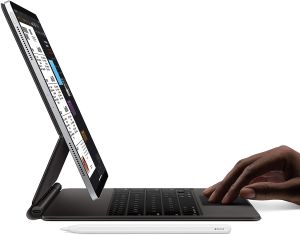
Apple refreshed its flagship tablets with the Apple iPad Pro 12.9 inch (2020) series on 18 Mar 2020. In this articles, although there are not extensive tests to determine if the 12.9-inch model can replace a laptop, the new device certainly puts a new spin on how people can use a large-screen computing device, even though the improvements are incremental.


Looks

In terms of looks, there is nothing to differentiate between the latest iPad Pro and its predecessor, which was launched about 18 months ago.

In fact, the new 12.9-inch iPad Pro shares the same physical dimensions as its predecessor and it is just a teeny 10g heavier.

Apple iPad Pro 12.9-inchCamera

Perhaps the most significant difference is the extra 10-megapixel (MP) ultra-wide-angle camera and the light detection and ranging (lidar) scanner in the new iPad Pro’s rear camera system, which retains the 12MP wide-angle camera of its predecessor. These additions could be why the new tablets are slightly heavier.

The dual-camera unit does not have the night mode of the iPhone 11. Neither does it have the iPhone 11’s image quality. Shooting the same scene, the iPhone 11 Pro Max delivers much better dynamic range and sharpness compared with the new iPad Pro.

The lidar scanner measures distance by how long it takes light to reach an object and be reflected back. The scanner has a 5m range and works both indoors and outdoors. Combined with the two cameras, it promises a more immersive and accurate augmented reality (AR) experience.

AR Apps

Using the native Measure AR app, you can measure the length of a 30cm ruler and got a spot-on 31cm reading (the ruler has an around 1cm space after its measurement markings end). In a test, we measured a dining table and only the breadth is off and just by 1cm.

Depending on the seller (eg. IKEA), you can also use their apps to “placed” an laptop table in your living room. With this, you can compare the laptop table’s specified height to the actual height of my sofa (they looked level in the AR app) and they are a match.

Mouse and Trackpad support

The launch of iPadOS 13.4 brings official mouse and trackpad support to all iPad models. While the iPad Pro already has mouse and trackpad support since the launch of iPadOS 13 in September last year, the latest iPadOS still makes a significant upgrade with many quality-of-life changes.

With older iPadOS 13 versions, you have to dive deep into the Accessibility options to activate the mouse cursor. You can now do so easily under the General setting.

Instead of a huge circle, the mouse cursor is a little greyish dot in iPadOS 13.4. It disappears when you are not using it and appears when you tap on the trackpad.

The cursor also changes according to context – for instance, it turns into the familiar I-beam shape when you point it over text. This works on most apps, including the native Mail, Safari and Notes apps.

There are also iPad-specific trackpad gestures you can use to speed up productivity. For instance, a three-finger swipe up on the trackpad will lead you to the home screen.

All all these features are tested with the new Smart Keyboard Folio and Apple’s Magic Trackpad 2 that Apple successfully.

Of course, I would like to have used the new Magic Keyboard for iPad Pro ($519 for the 12.9-inch iPad Pro version) that comes with its own trackpad and adjustable hinge, but it will be available only in May 2020.

Processor

The Apple iPad Pro (2020) is powered by Apple’s new A12Z Bionic processor, which Apple says outperforms the processor in a vast majority of portable PCs sold last year. This chip also has the latest Wi-Fi 6 technology.

Using Photoshop to edit photos and iMovie to edit videos were swift and seamless operations, especially if you use the trackpad to drag and drop video clips or cut audio to fit.

Battery

In an independent intensive battery test (looping a 720p video with Wi-Fi switched on and the display at full brightness), the review unit lasted 10 hours and 10 minutes – five minutes more than the 2018 12.9-inch iPad Pro.

Conclusion

The Apple iPad Pro 12.9 inch (2020) delivers more value than its predecessor, but it is still an expensive tablet.

If you want the iPad Pro to be a laptop replacement, you probably will want to buy the Magic Keyboard, which brings the total cost to $2,988.  That is more expensive than Apple’s flagship standard 13-inch MacBook Pro ($2,899). Of course, you will not be getting a gorgeous touchscreen display.

Pros
  • Gorgeous display.
  • Great overall performance.
  • Enhanced AR experience.
  • iPadOS 13.4 makes the iPad experience more desktop-like.
Cons
  • Expensive.
  • Magic Keyboard not available yet.
Apple iPad Pro 2020
Operating system: iPadOS 13.4
Processor: Apple A12Z Bionic with Neural Engine, M12 co-procesor
Display: 12.9 inches, 2,732 x 2,048 pixels
Camera: 12MP wide-angle camera, 10MP ultra-wide-angle camera, Lidar scanner (rear); 7MP TrueDepth Camera (front)
Weight: 641g (Wi-Fi), 643g (Wi-Fi + Cellular)
Check Price


Related Resources

  • Best Smartphone
  • Best mid-range smartphone cameras

Filed Under: Tablet Tagged With: Apple iPad Pro 12.9-inch (2020)

Oppo Find X2 Pro 5G Review

Last Updated 29 March 2020

The Oppo Find X2 Pro 5G is the latest flagship model from the Chinese smartphone brand Oppo that is set to challenge the big boys like Samsung and Huawei. It ticks all the boxes for a premium model and rivals Samsung’s flagship Galaxy S20 Ultra in having the latest features, such as a 120Hz Oled screen and 5G connectivity.

The Oppo Find X2 Pro 5G is the most expensive Oppo smartphone to date. It costs nearly as much as the Samsung Galaxy S20 Ultra and represents a hefty increase from Oppo’s last phone, the Reno 10x Zoom.


External feel

The orange vegan leather review unit certainly looks and feels expensive, with gold trimmings around the edges and a gold Oppo logo. Its faux leather finish feels luxurious. The Find X2 Pro also comes in a less ostentatious black ceramic version.

Its design is rather conventional for a modern smartphone.

Screen

The front is practically all screen, with its 6.7-inch display curving around the edges on the left and the right. You will barely noticed the small hole-punch front camera at the top left corner. Its in-display fingerprint sensor is as fast as any on the market currently.

One highlight is its high-resolution 1,440p display, which can run at a 120Hz refresh rate.

At this high refresh rate, navigating the phone interface or scrolling a Web page would appear smoother than on the usual 60Hz screen.

Several games, such as shooter game Shadowgun Legends and racing title CSR Racing 2, can also run at 120Hz, which should result in less stuttering and screen tearing.

The screen is very bright and is usable outdoors under the sun. A “Nature Tone Display” feature adjusts the display’s colour temperature to match the ambient light, making the display look warmer and less harsh to the eyes.

Oppo says the screen has a wide colour gamut, allowing it to show more realistic images. The Find X2 Pro is certified to show high-dynamic-range (HDR) content from Netflix similar to other high-end phones.

Camera

The primary camera is a 48MP camera that uses a new Sony sensor that is larger in size than the previous version. The older Sony sensor is also here, used on the secondary 48MP ultra-wide angle camera. Finally, there is a 13MP periscope-style telephoto camera that offers up to 5x optical zoom (and 60x digital zoom).

By default, the main camera produces 12MP photos from its 48MP sensor, by combining four pixels into one.

The camera has very quick autofocus. In good lighting conditions, the photos look sharp with accurate colours and little noise.

Noise was also kept to a minimum in low light conditions, though the level of detail dipped. Although the Find X2 Pro has an Ultra Dark mode that uses long exposure for low-light conditions, I found the colours to be slightly off in this mode.

When shooting an object close up, the camera produced a pleasant out-of-focus effect for more distant items, like the bokeh effect in portrait modes. The camera’s portrait mode worked well enough without any obvious artefacts around the hair and clothing of the subjects.

You will also be impressed by the camera’s video stabilisation feature. Videos look reasonably smooth even when recording while walking briskly. The camera can shoot videos of up to 4K resolution at up to 60 frames per second.

Onscreen Interfaces

Oppo has decluttered its ColorOS user interface. Based on Android 10, the latest 7.1 iteration adopts Google’s apps for the browser, e-mail and keyboard input instead of its own proprietary versions. You will prefer this cleaner and leaner ColorOS, though Oppo can go even further by, for instance, removing its smart assistant for the Google Assistant.

Processor

Inside the Find X2 Pro is Qualcomm’s top Snapdragon 865 processor, which is likely to appear in most flagship Android phones this year. There is also 12GB of system memory, along with 512GB of internal storage. The latter makes up for the phone’s lack of a microSD slot.

In the Geekbench 5 benchmark tests, the Find X2 Pro scored 899 (single-core) and 3,256 (multi-core). In comparison, Samsung’s flagship S20 Ultra, which uses Samsung’s Exynos 990 chip, managed 917 and 2,769 respectively.

You probably won’t be able to tell the difference between the two in every day use though. Apps open promptly and games feel smooth in the Find X2 Pro.

In a video-loop battery test, the Find X2 Pro lasted 10hr 35min, which is decent considering that the screen was set at its highest resolution and maximum brightness and was running at 120Hz. The phone typically has between 30 to 40 per cent battery life remaining at the end of a work day.

Speed of charging

And even if you forget to charge it at night, it takes just a short while to recharge. The Find X2 Pro has a very fast 65W charger that can replenish the battery from zero to full in around 40 minutes.

Conclusion

The Oppo Find X2 Pro 5G is arguably the best smartphone from Oppo so far. While it does not break new ground, it should help Oppo make inroads into the premium smartphone segment.

Pros
  • Vibrant and bright screen with 120Hz refresh rate.
  • Flagship-tier cameras.
  • Luxurious, vegan leather option.
  • Cleaner interface than previous Oppo phones.
Cons
  • Expensive.
  • Rear camera bulge.
Oppo Find X2 Pro 5G
Oppo Takes On Big Boys
Processor: Qualcomm Snapdragon 865 (Single-core 2.84GHz, triple-core 2.4GHz and quad-core 1.8GHz)
Display: 6.7-inch Oled, 3,168 x 1,440 pixels, 513 ppi pixel density
Operating system: ColorOS 7.1 (Android 10)
Memory: 512GB, 12GB RAM
Rear Cameras: 48MP (f/1.7), 48MP ultra-wide (f/2.2, 120-degree), 13MP telephoto (f/3.0)
Front Camera: 32MP (f/2.4)
Battery: 4,260mAh
Check Price


Related Resources To Oppo Find X2 Pro

  • Best Smartphone
  • Best mid-range smartphone cameras

Filed Under: Phone Tagged With: Oppo Find X2 Pro 5G

SanDisk Extreme Pro E80 portable SSD Review

Last Updated 22 March 2020

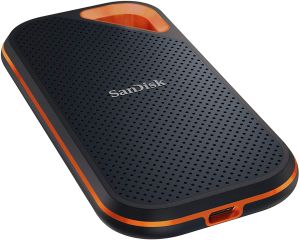
The SanDisk Extreme Pro E80 portable SSD (Solid-State Drive) is designed for photographers and videographers who need portability, durability and performance.  It comes in a rectangular aluminium unibody case with rubberised exterior. With a footprint that is slightly bigger than a credit card, this sleek-looking SSD is 10.2mm thick and weighs a mere 79 allowing it to easily fits into any backpack pocket. Plus, it has a hole at one of its corners for you to thread a carabiner (not included) through, so you can carry it outside your camera bag for quick access.


Great protection features

It has an IP55-rating for protection against dust and water, and is shock-resistant against drops from up to 2m high – good for photographers who are always battling the elements. It also comes with five years of warranty.

Format and software

The SSD comes pre-formatted in the exFAT format, which means it is compatible with both Mac and Windows machines out of the box – great for someone who works on both platforms. But you can always re-format it to the format you prefer.

It also comes with a free security software called SecureAccess that lets you set up a 128-bit-encrypted data vault to store your valuable data.

Connectivity

However, the SSD has an exposed USB-C port that does not have a cover. Thus, it is probably resistant only to water splashes and not submersion.  In addition, it does not have an activity indicator light. Having one would have helped a lot, by allowing users to know whether the SSD is connected or if a transfer is ongoing.

Two cables – a USB Type-C to C and a USB Type-C to A – are included, with the latter useful for laptops that do not have a USB-C port.

Performance

Supporting the USB 3.1 Gen 2 interface, the SSD is supposed to have a maximum performance of up to 1,050MB/s.

To test the SSD, we connect it to my 2018 MacBook Pro and Windows gaming rig. In the Mac-only BlackMagic Disk Speed Test benchmark test, the SSD achieves a maximum writing speed of 953MB/s and a maximum reading speed of 922MB/s.

In the Windows-only CrystalDiskMark benchmark test, it achieves a sequential read speed of 463MB/s and a sequential write speed of 466MB/s.

For a more practical test, we transfer a folder containing 56GB worth of photos and videos from a MacBook Pro to the Extreme Pro. The transfer is completed in 89 seconds – that is amazingly fast.

Conclusion

This is available in capacities of 500GB, 1TB  and 2TB, you may find the Extreme Pro is priced a bit on the high side.  However after comparing all the features and its light-weight, as a photographer, my inclination is this SanDisk Extreme Pro E80 portable SSD is a great SDD to carry around whole day.

Pros
  • Rugged, sleek-looking case.
  • Works with Mac and Windows machines out of the box.
  • Fast transfer speeds.
  • Five-year warranty.
Cons
  • Expensive.
  • Water resistance could be better.
  • No activity indicator light.
SanDisk Extreme Pro E80 portable SSD
Fast Transfer at very Light Weight
Capacity: 500g, 1TB, 2TB
Interface: USB 3.1 Gen 2
Weight: 79g
Thickness: 10.2mm
Maximum Transfer Rate: 1,050MB/s
Cables provided: USB Type-C to C; USB Type-C to A
Software Included: SecureAccess
Check Price
 

Related Resources To SanDisk Extreme Pro E80 portable SSD

  • Best Camera
  • Digital Camera Pal
  • Digital Camera Accessories

Filed Under: Product Reviews, Storage Tagged With: SanDisk Extreme Pro E80 portable SSD, SSD

Best Voice-Over Headphones in 2020

Last Updated 6 January 2020

bruce mars at Pexels

Having a modern best voice-over headphones in 2020 that allows you to pick calls without interrupting your music playlist or broadcast applications is a nice proposition, isn’t it?

However, not all headphones are suited to deliver this kind of value to the user. Frequent call interruptions can limit your user experience especially if you are in a public place. If you want to be able to enjoy your digital applications on the go without having to touch your smartphone as often as a call comes through, you will need to go for a voice-over headphone that allows you to pick and respond to calls with just a click of a control button.

With plenty of options on the market, it becomes quite difficult selecting a suitable voice-over headphone for your needs. That is why in this article we have reviewed some of the best ones on the market for an easier buying decision from you.

If you want to skip all that, I summarize the best ones below:

  • If you want to have the best value without sacrificing quality, PreSonus’ HD9 headphone or Beyerdynamics DT-250 are smart choices to go for.
    .
  • As for elegance, comfort, and innovation, the Bose 700 with Alexa technology is the clear winner.


Below we review 5 of the best voice-over-headphones in 2020 that have advanced features.

A Spotlight On The Best Voice-Over Headphones In 2020

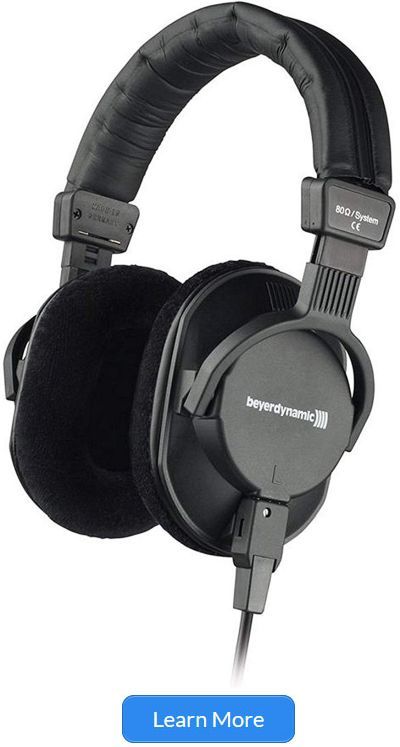
Beyerdynamic DT-250
Price: $199
Fit: Over-ear
Dimension: 9.1 x 4.7 x 8.7 in
Weight: 0.53 lbs
Special Feature: Lightweight model
Check Price
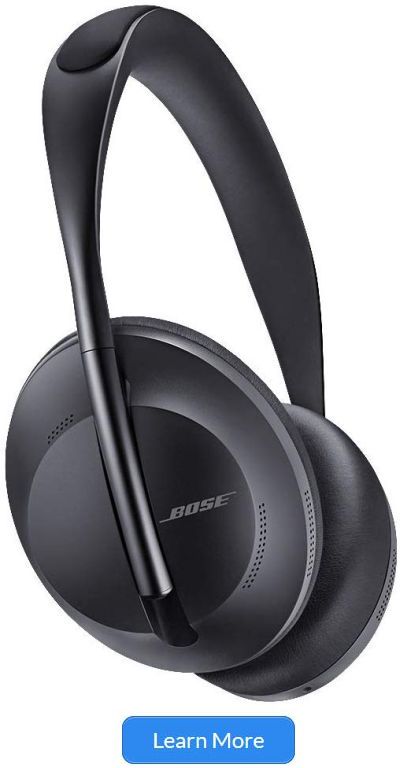
Bose Noise 700
Price: $399
Fit: Over-ear
Dimension: 2.0 x 6.5 x 8.0 in
Weight: 0.55 lbs
Special Feature: Noise Cancellation
Check Price
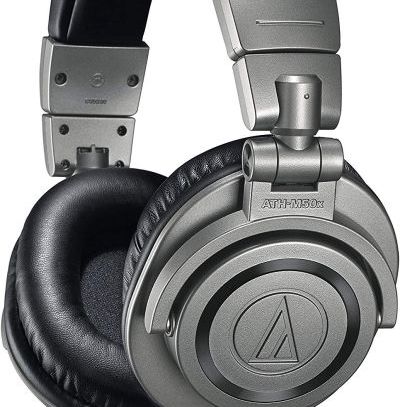
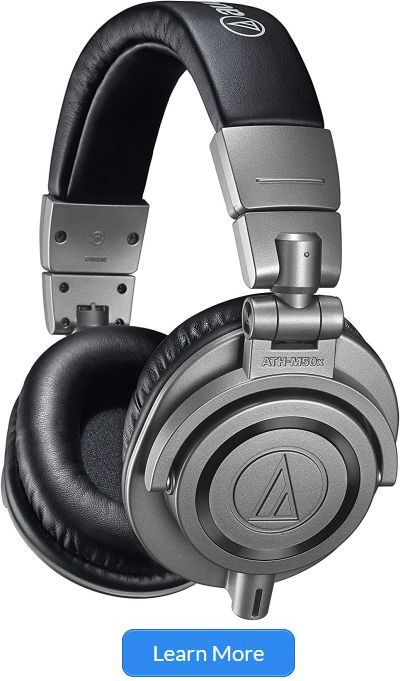
Audio-Technica ATH
Price: $147
Fit: Over-ear
Dimension: 9.0 x 4.0 x 8.0 in
Weight: 1.68 lbs
Special Feature: Foldable model
Check Price
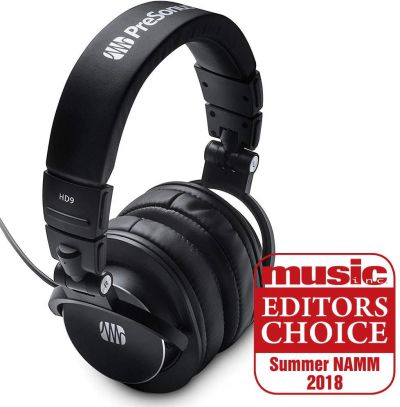
PreSonus HD9 Professional
Price: $79.95
Fit: Over-ear
Dimension: 3.4 x 5.8 x 8.5 in
Weight: 0.50 lbs
Special Feature: Lightweight model
Check Price
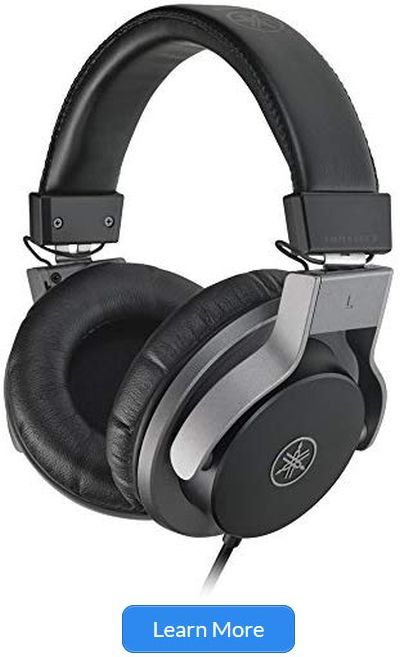
Yamaha HPH-MT7
Price: $169
Fit: Over-ear
Dimension: 10.4 x 4.9 x 10.9 in
Weight: 0.97 lbs
Special Feature: Lightweight model
Check Price


Reviews of The Best Voice-Over Headphones in 2020:

Beyerdynamic DT -250-250OHM Lightweight Closed Dynamic Headphone for Broadcast and Recording Applications, 250 Ohms

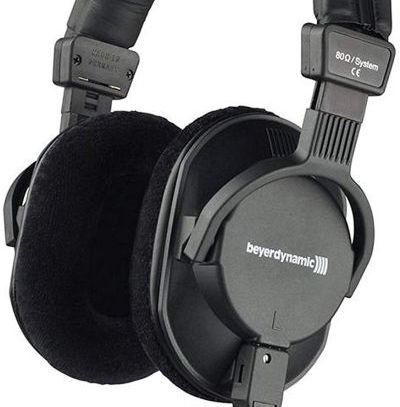
Beyerdynamic DT 250 is a lightweight headphone that offers you fantastic noise isolation no matter your environment. The DT 250 is suitable for all types of digital and broadcast recording applications including highly advanced professional audio mix applications.

If your ear is overly sensitive to ear pads, you can trust the DT-250 for its cushioning system on both ear pads which serves to protect your ears. Included in the product packaging are a coiled cable, an adapter, and a stereo mini-jack. When outdoors, you can continue to enjoy the value this device provides due to its powerful magnetic system made of neodymium.

Pros
• Produces quality sound output that does not irritate the eardrums
• Excellent fit and balance for both ears
• Isolates external sounds as well as it should
• Works well with most mobile phones

Cons
• An amplifier may be needed to enjoy the full value
• Not very comfortable when you have glasses on

Bose Noise Cancellation Wireless Bluetooth Headphones 700, with Alexa Voice Control, Black

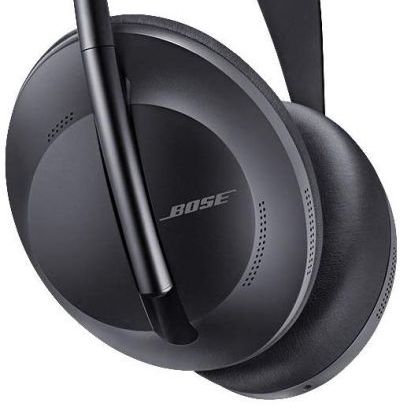
Any device that uses Alexa technology is always sought after by many because Amazon’s Alexa transforms an average device into something more sophisticated and advanced. Bose 700 redefines headphones sophistication with advanced features that many other headphones lacks with its microphone system, which can be used for voice pickup.

Without moving a muscle, you can begin to enjoy much more from your smartphone by adding this accessory to your collection. I regard the Bose 700 as a unique augmented reality gadget for your ears because it connects you to the digital world and the physical world at the same time.

Some may have issues with the compulsory Bose application downloads to get it to work, but that along with its cost is a small value to pay when you consider what it offers you. If you have the cash to spare, I strongly recommend this headphone for an ultimate listening experience.

Pros
• Superior metallic build
• Modern attractive look
• Has a Swipe for Volume regulation
• The Alexa software increases user experience
• Easy call pickups and drop-offs

Cons
• Only works after downloading the Bose App
• Earpad heats up when noise cancellation feature used

Audio-Technica ATH – M50xGM Professional Headphones, Gun Metal

Audio-Technica has a long-range of professional headphones, but this model makes it to our list for several reasons.

For starters, the ATH-M50xGM is the most advanced model by the manufacturer in their M-series portfolio.

Secondly, this version is highly revered by professional reviewers and audio engineers who know a thing or two about voice over headphones.

If you spend your money on the ATH-M50xGM, it will money well spent at the end of the day because of the integrated features it provides. We are talking about a headphone that has a sonic signature sound output, effective sound isolation ear cups, and ergonomically robust construction.

The detachable cable is made of neodymium and you can connect it to iPods, iPhones, Android devices, Computers, and many other digital devices of your choosing. Of all Audio-Technica’s M-Series headphone range, the ATH-M50xGM is flawless in every sense of the word.

Pros
• The best headphones for the price it is sold for
• Blocks out the noise in public places
• Extra removable replacement cord
• Feels great even when you wear glasses
• Ideal for professional and everyday use

Cons
• None we could point to

PreSonus HD9 Professional Monitoring Headphones, One Size

Imagine the satisfaction of listening to high definition sounds directly from two ear cups attached to your ears? The feeling is better experienced than explained.

PreSonus’ HD9 monitoring headphones are a closed-back piece that delivers superior acoustic sound quality. The isolation mechanism of this device allows you to enjoy the full value of your sounds without disturbing other people around you.

The main reason why it makes our list is because of its multipurpose use. You can use it as an everyday headphone or for professional use. Furthermore, it offers a clear and transparent response without distorting the sounds you are listening to in any way.

For those who love and breathe music, I can only point to a few other brands that deliver the same quality at the same price.

Pros
• Great for Desktop and Laptop computers
• Cheap Price
• Good low-frequency sound output
• Nice packaging

Cons
• Not the best headphone for professional use

Yamaha HPH-MT7 Monitor Headphones, Black

The Yamaha HPH-MT7 Monitor Headphones is another Monitor-class headset to make our list similar to PreSonus’ HD9. Yamaha’ HPH-MT7 can reproduce a near-perfect sound quality from the original source and is ideal for mixing, recording or general studio work.

The 40mm CCAW voice coils deliver an expansive range frequency and an above-average response. To ensure that your ears are well protected, the ear pads are fitted with smooth leather (synthetic) and low resistance cushions.

Basically, we found out that this headphone is best for indoor use, but that is not to say that you can’t enjoy using outdoors as long as your device allows it.

The HPH-MT7 may not be the best voice over headphone in the market, but it is worth its value, and you may even consider it to be cheap after using it a few times. As an extra benefit, the package comes with a 6.3mm stereo adapter as well as a carrying bag.

Pros
• Good sound isolation
• Reduces mechanical studio noise
• Ideal for low volume sound frequencies
• Works well with cables for other headphones such as Audio Technica cables

Cons
• The bass output is a bit heavy
• Does not block out external sounds completely

Concluding Remarks

Buyers are often spoilt for choice when picking a suitable voice over headphone that is worth the value. All the brands reviewed in this article have various feature that set one apart from the others, but they all offer the same value in terms of sound quality output and noise isolation.

If you want to have the best value without sacrificing quality, PreSonus’ HD9 headphone or Beyerdynamics DT-250 are smart choices to go for.

As for elegance, comfort, and innovation, the Bose 700 with Alexa technology is the clear winner.

Related Best Voice-Over Headphones Resources

  • Headphones Buy Guide
  • On-ear headphones
  • Over-ear headphones
  • Earbud headphones
  • Headphone accessories

Everything you need to know before buying your Headphones:


Filed Under: Best Headphones, Product Reviews Tagged With: best headphones, best voice-over-headphones

  • « Go to Previous Page
  • Page 1
  • Page 2
  • Page 3
  • Go to Next Page »

Buyer’s Guide

Best Smartwatch And Buyer Guide

Best Wireless Charger And Buyer Guide

Best Laptops and Buyer Guide

Best Robot Vacuum Cleaner Review and Buyer Guide

Best Mid-Range Smartphone Cameras

Best Voice-Over Headphones in 2020

Review of the Best Gaming Monitors and Buyer’s Guide

Recent Reviews

  • Best Smartwatch And Buyer Guide
  • Best Wireless Charger And Buyer Guide
  • Best Laptop During Lockdown And Buyer Guide
  • OnePlus 8 Pro 5G Dual SIM Review
  • Best Robot Vacuum Cleaner Review and Buyer Guide
  • Huawei P40 Pro 5G Review
  • Apple iPad Pro 12.9-inch (2020) Review
  • Oppo Find X2 Pro 5G Review
  • SanDisk Extreme Pro E80 portable SSD Review
  • Best Voice-Over Headphones in 2020

Categories

  • Best Gadgets of the Year
    • Best Camera
    • Best Fitness Gadgets
    • Best Game
    • Best Headphones
    • Best Laptop
    • Best Router
    • Best Smartphone
    • Best Smartwatch
  • Gadget Gift Guide
    • Tech Gifts Ideas For Her
    • Tech Gifts Ideas For Him
    • Tech Gifts Ideas For Kids
  • Product Reviews
    • Laptop
    • Phone
    • Robot
    • Smartwatch
    • Storage
    • Tablet

Other Gaming Accessories

Game Hardware deals 

Gaming Monitors deals

Monitor Accessories deals

Headphones deals

What You Need to Know About Buying Monitor – Read Our Guide On This Page For More Details

https://youtu.be/pfxS2Z8PAUQ
 

HOME          Contact          Affiliate Disclosure          Terms of Service          Privacy Policy          SITEMAP


Copyright © 2026 techproductsaudit.com, ALL RIGHTS RESERVED.

This website uses cookies to improve your experience. We'll assume you're ok with this, but you can opt-out if you wish.Accept Read More
Privacy & Cookies Policy

Privacy Overview

This website uses cookies to improve your experience while you navigate through the website. Out of these, the cookies that are categorized as necessary are stored on your browser as they are essential for the working of basic functionalities of the website. We also use third-party cookies that help us analyze and understand how you use this website. These cookies will be stored in your browser only with your consent. You also have the option to opt-out of these cookies. But opting out of some of these cookies may affect your browsing experience.
Necessary
Always Enabled
Necessary cookies are absolutely essential for the website to function properly. This category only includes cookies that ensures basic functionalities and security features of the website. These cookies do not store any personal information.
Non-necessary
Any cookies that may not be particularly necessary for the website to function and is used specifically to collect user personal data via analytics, ads, other embedded contents are termed as non-necessary cookies. It is mandatory to procure user consent prior to running these cookies on your website.
SAVE & ACCEPT